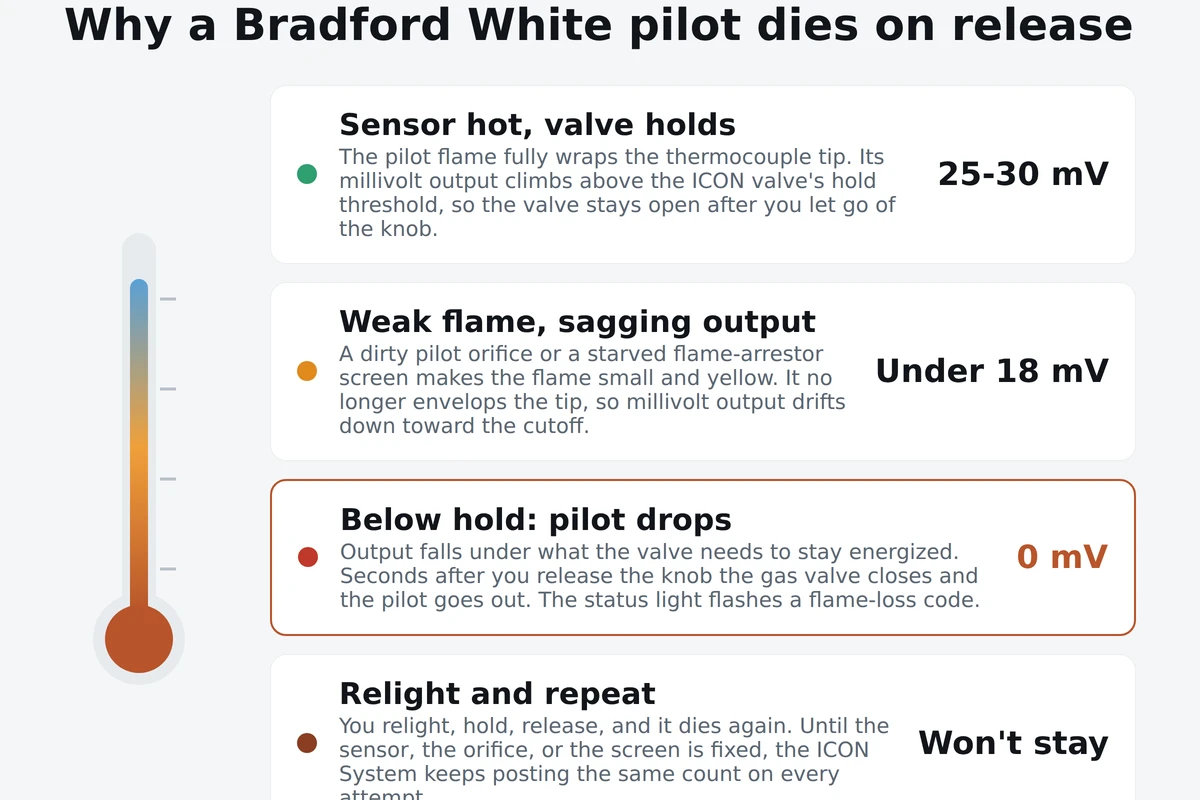
A Bradford White pilot that lights while you hold the knob and then dies a few seconds after you let go is telling you one specific thing: the sensor that holds the gas valve open is not getting hot enough. On these heaters that sensor is a thermocouple, and it feeds the ICON System, Bradford White's Intelligent Control gas valve with a status light that flashes diagnostic codes. When the pilot flame is strong and wraps the sensor tip, the millivolt output climbs above the valve's hold threshold and the valve stays open on its own. When the flame is weak, or the sensor is worn, the output sags below that threshold and the valve snaps shut. This page walks the light-and-hold procedure, reads what the ICON status light is telling you, and routes each cause to a fix, cheapest first.
- Pilot lights fine while you press the knob, then dies within seconds of release: classic weak thermocouple that cannot hold the valve open.
- Pilot flame looks small, yellow, or flickering instead of a firm blue that engulfs the sensor tip: dirty or clogged pilot orifice, or a starved flame-arrestor screen.
- You held the knob less than 60 seconds before releasing: relight and hold a full minute so the sensor reaches full temperature.
- Status light flashing a burst code: count the flashes and match them to the legend under the jacket, flame loss versus over-temp versus sensor fault.
- Lint or dust matted on the Defender flame-arrestor screen at the base: vacuum it clean and clear everything stored against the heater.
| Hold time on relight | About 60 seconds with the knob pressed to PILOT |
| Healthy pilot flame | Firm blue, fully enveloping the thermocouple tip |
| Thermocouple hold range | Roughly 25 to 30 mV; drops below ~18 mV and the valve lets go |
| Status light location | On the ICON gas control valve at the front base of the tank |
| Code legend | Label under the jacket / on the burner-access panel is the authority |
| Cheapest fix first | Sensor, then pilot orifice, then flame-arrestor screen, then valve |
Read the ICON status light before you touch anything
The ICON System is not a plain mechanical valve. It is Bradford White's Intelligent Control, built around a Honeywell/Resideo gas control with a small status light that flashes fault codes. Before you start swapping parts, read that light, because it separates a flame-loss problem from an over-temperature trip or a sensor fault, and those go three different directions. The diagnostic below is the order that saves you the most money and time.
Watch the status light and count one burst
The light sits on the gas control valve at the front base of the tank. Let one full burst-and-pause go by without counting, just to feel the rhythm. Then count only the quick flashes inside a single burst, stop at the long pause, and confirm the same count on the next burst. Write it down before you relight, because cycling the knob clears the readout.
Match the count to the legend under the jacket
The counts are not identical across every model year, so the chart that matters is printed on the label under the heater's jacket or near the burner-access panel. Match your count there. A flame-loss code points at the pilot and sensor. An over-temperature code points at the thermal well and setpoint. A sensor-fault code points at the ICON board or the thermal-well sensor itself.
Run the light-and-hold test
Turn the knob to PILOT, press it down, light the pilot, and hold the knob for a full sixty seconds. Watch the flame while you hold: it should be a firm blue that completely wraps the thermocouple tip. Release the knob. If the pilot dies within seconds, the sensor is not holding the valve open.
Judge the pilot flame quality
A healthy pilot is blue and steady and engulfs the sensor tip. A flame that is small, yellow, lifting, or flickering off the tip cannot heat the sensor enough. That look tells you the pilot orifice is dirty or the flame-arrestor screen is starving the flame of air, before you ever touch the thermocouple.
Work the cheap parts in order
If the flame is weak, clean the pilot orifice and vacuum the flame-arrestor screen first. If the flame is strong but the pilot still drops on release, replace the thermocouple. Only after the sensor, orifice, and screen are all good and the pilot still cannot hold do you look at the ICON gas valve, the priciest part on the list.
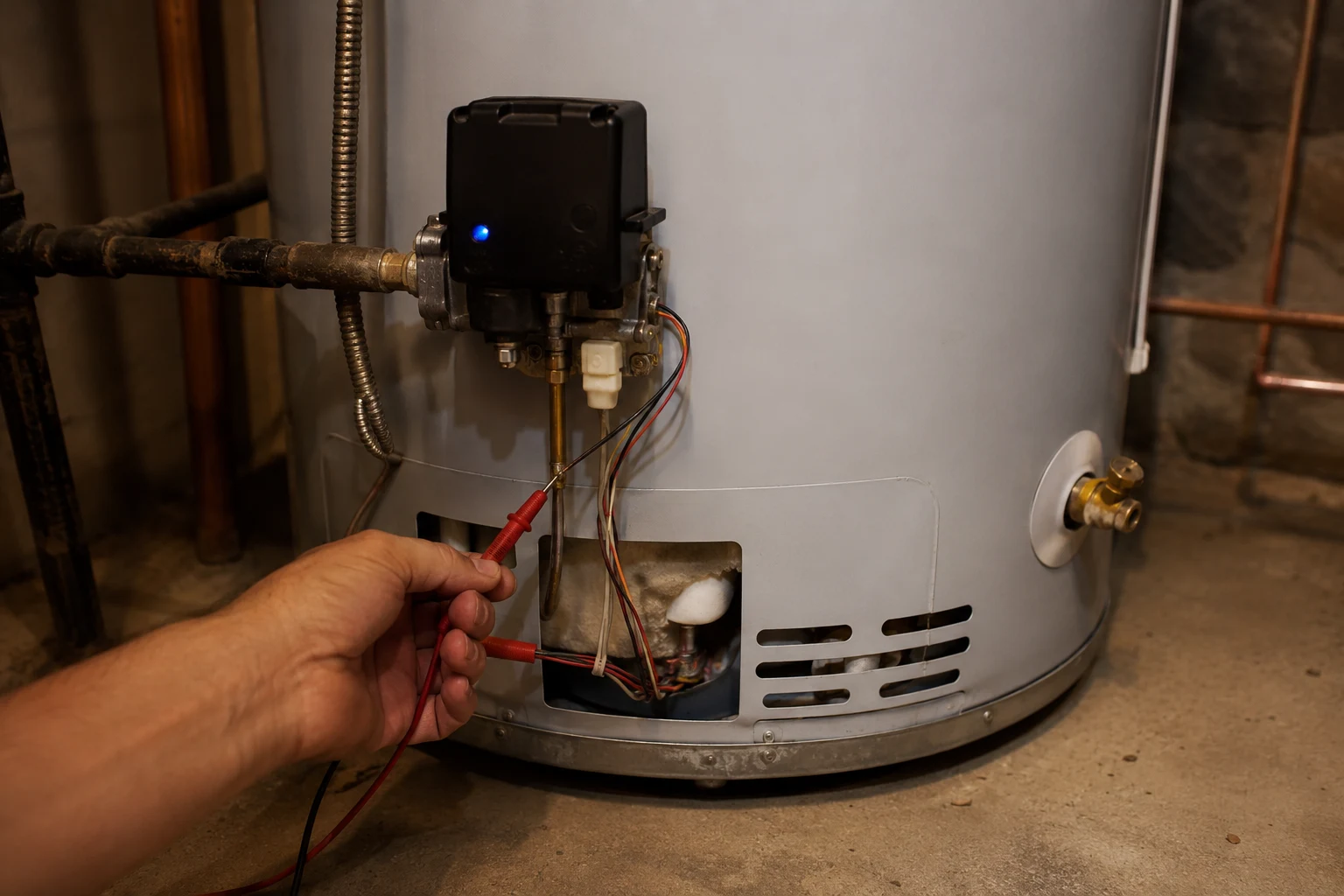
A pilot that lights while you hold the knob and dies on release is not a mystery. The sensor is not hot enough to hold the valve open, and that is almost always a worn thermocouple or a starved flame, not a failed gas valve.
The five causes, cheapest to most expensive
Once the status light has pointed you at a flame-loss problem, the causes fall in a clear order of likelihood and cost. Work them top to bottom. Most Bradford White pilots that will not stay lit are fixed in the first two, and the expensive valve is genuinely rare.
Weak thermocouple
The pilot lights and burns fine while you hold the knob, then dies within seconds of release. The sensor's millivolt output has dropped below the ICON valve's hold threshold. This is a cheap part, usually under twenty-five dollars, and homeowner work with a wrench. Replace it before anything pricier.
Dirty or clogged pilot orifice
The pilot flame is small, yellow, or flickering and does not fully engulf the sensor tip, so the sensor never gets hot enough. Dust, spider webbing, or scale in the tiny orifice chokes the gas. Clean the orifice and pilot tube and the flame comes back to a firm blue that wraps the tip.
Clogged flame-arrestor screen (Defender)
The Defender Safety System screen at the base mats with lint and dust and starves combustion air, so the pilot goes weak and may trip a shutdown with its own ICON code. Vacuum the screen clean and clear everything stored against the heater. Free to fix and easy to overlook.
Drafts or bad venting
A downdraft or a spillage problem can pull the pilot flame off the sensor tip so it drops intermittently. This can also trip a thermal spill or roll-out switch. Do not force it back on. A blocked flue or bad draft is a safety issue that needs the cause found, not a reset.
Failing gas valve or ICON board
Only after a known-good thermocouple, a clean pilot orifice, and a clean screen still will not hold the pilot, or the status light flashes a valve or sensor-fault code that will not clear, do you look at the ICON valve. It is the most expensive part, so it comes last, not first.
The light-and-hold procedure, done right
Most failed relights are a rushed relight. The hold time is not a suggestion. While you press the knob you are manually holding the gas valve open, and the pilot flame is heating the thermocouple. The sensor needs the full time to reach temperature and build enough millivolts to hold the valve on its own. Let go early and the valve closes the instant you release, and it looks like a failure that was really an impatient hand. Do it in order and give the sensor its seconds.
What the counts route to, and where to stop
The ICON System pairs with the Defender Safety System, so the status light does more than report a dead pilot. It separates a flame-loss problem, which is the pilot and sensor story on this page, from an over-temperature trip, which points at the thermal well and setpoint, from a sensor fault, which points at the board or the thermal-well sensor. Count the flashes, match them to the label under the jacket, and let the count decide the direction. A flame-loss code sends you to the thermocouple, the pilot orifice, and the flame-arrestor screen. That covers the vast majority of pilots that will not stay lit.
Where you stop matters. The thermocouple, the pilot orifice, and the flame-arrestor screen are all homeowner work: a wrench, a soft brush or fine wire, and a vacuum. The ICON gas valve is a different job, expensive and worth confirming under warranty before you buy, because Bradford White gas heaters carry multi-year parts coverage and the valve is usually covered. And some reasons a pilot will not hold are safety features working. A tripped thermal spill or roll-out switch means heat is spilling where it should not, often a blocked flue or a venting problem, and forcing that back on without finding the cause is the wrong move. A Defender flammable-vapor lockout means it sensed combustible fumes near the heater. In either case, do not keep relighting. Shut the gas and bring in a licensed pro.
So follow the pilot's own behavior. If it lights and dies on release after a full hold, the sensor is not holding the valve, and you work the thermocouple, the orifice, and the screen in that order. If the status light throws a code, count it against the label under the jacket and let the count point the way. The ICON System is not hiding the problem from you. It is spelling it out in flashes, and a pilot that will not stay lit is, almost every time, one of the three cheap parts standing between the flame and the sensor.
Frequently asked
Why does my Bradford White pilot light but not stay lit?
Because the part that holds the gas valve open is not getting hot enough to do its job. On a Bradford White gas heater the pilot flame has to heat a thermocouple, a small sensor that turns that heat into a tiny voltage measured in millivolts. That voltage is what tells the ICON gas valve the pilot is burning, so the valve stays energized once you release the knob. When the sensor is worn, or the pilot flame is too small or yellow to wrap the sensor tip, the millivolt output sags below the valve's holding threshold. The valve reads that as no pilot and snaps shut, and the pilot goes out a few seconds after you let go. Nine times out of ten this is a weak thermocouple or a dirty pilot, not the expensive gas valve. Start by holding the knob a full sixty seconds so the sensor heats completely, then release. If it still drops, clean or replace the sensor before you suspect anything else.
What is the ICON System on a Bradford White water heater?
The ICON System is Bradford White's Intelligent Control gas valve, built around a Honeywell/Resideo gas control with a small status light that blinks diagnostic codes. Instead of a plain mechanical valve, it watches the pilot, the water temperature, and its own sensors, and it reports faults by flashing the LED a set number of times in each burst. A pilot that will not stay lit usually shows up as a flame-loss or sensor code. The counts are not universal across every model year, so the legend that matters is the label printed under the heater's jacket or on the burner-access panel. Count the flashes in one burst, wait for the pause, confirm the same count on the next burst, and match it to that on-appliance chart rather than a generic table. The ICON System pairs with the Defender Safety System, the flammable-vapor-resistant design that adds a flame-arrestor screen and a thermal-well sensor, so some codes point at those parts too.
How long should I hold the pilot button on a Bradford White?
About sixty seconds. Turn the gas control knob to PILOT, press and hold it down, light the pilot, and keep the knob depressed for a full minute before you release it. That hold time is not arbitrary. While you hold the knob you are manually forcing the gas valve open, and the pilot flame is heating the thermocouple. The sensor needs those seconds to reach full temperature and build its millivolt output high enough to hold the valve open on its own. Let go too early, at ten or fifteen seconds, and the sensor has not warmed up, so the valve closes the instant you release and you blame the heater when the real problem was a short hold. If you hold the full sixty seconds and the pilot still dies on release, that rules out a rushed relight and points at a weak sensor, a dirty pilot, or a starved flame-arrestor screen.
How do I know if it is the thermocouple or the gas valve?
Timing and cost tell you which to chase first. A thermocouple problem shows a clear pattern: the pilot lights and burns fine while you hold the knob, then dies within a few seconds of release, every time. That is the sensor failing to hold the valve open, and it is a cheap part, usually under twenty-five dollars and homeowner work. A gas valve or ICON board fault is different. The valve may not let the pilot light at all, or the status light flashes a valve or sensor-fault code that will not clear, or you have already replaced a known-good thermocouple and cleaned the pilot and it still drops. Because the ICON valve is far more expensive than a thermocouple, you always work the cheap parts first. Replace or clean the sensor, clean the pilot orifice, check the flame-arrestor screen, and only then, if the flame still cannot hold, do you look at the valve.
What does a clogged flame arrestor screen have to do with the pilot?
It starves the pilot of air. The Defender Safety System puts a flame-arrestor screen at the base of the heater as part of its flammable-vapor-resistant design. Over time lint, dust, and pet hair mat that screen and choke off the combustion air the pilot and burner need. Starved of air, the pilot flame goes small and yellow, it stops fully wrapping the thermocouple tip, and the sensor cannot get hot enough to hold the valve open, so the pilot dies on release. On many Bradford White units a badly blocked screen also trips a shutdown and the ICON status light flashes a specific code for it. Vacuum the screen and the area around the base clean, keep the space around the heater clear, and stop storing boxes and laundry against it. A clean screen is free to fix and is a common reason a good thermocouple still cannot keep the pilot lit.
Where is the status light and code legend on the ICON System?
The status light is on the gas control valve at the front base of the tank, the same valve you turn to light the pilot. It is a small LED that either glows steadily or flashes in bursts. The legend that explains the counts is printed on a label under the heater's jacket, often on or near the burner-access panel, and that on-appliance chart is the authority for your exact model. Count the quick flashes in a single burst, stop at the long pause, wait, and confirm you get the same count on the next burst before you act. Do not count the pause as a flash and do not count across it. A steady or slow single blink generally means the control is powered and normal, while multi-flash bursts are faults such as flame loss, over-temperature, or a sensor problem. Write the count down before you cycle the knob, because relighting clears the readout.
Is it safe to keep relighting a Bradford White pilot that won't stay lit?
Relighting a couple of times to confirm the pattern is fine. Standing there cycling the knob over and over for an hour is not the answer, and it can be a warning. Each relight dumps a little gas before ignition, so if the pilot never catches, stop, let any gas clear, and check for a gas smell before trying again. More important, some reasons a pilot will not hold are safety features doing their job. A tripped thermal spill or roll-out switch means the heater sensed heat spilling where it should not, often from a blocked flue or bad venting, and forcing it back on without finding the cause is dangerous. A flammable-vapor lockout on the Defender system means it detected combustible fumes nearby. If you smell gas that will not clear, or the pilot only dies when the flue is blocked or fumes are present, do not keep relighting. Shut the gas off and call a licensed pro.